What Is the First Thing I Should Do After Installing the E-PasswordCard App?
After installation, E-PasswordCard generates your personal password card. The unique mix of letters, numbers, and symbols is your base for secure passwords.
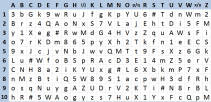
Select your personal pattern to choose passwords from the card
Choose a particular pattern that you will use for all your passwords and a specific path on the shape to generate the letters of your password.
- Your preferred pattern should cover at least 10 characters on your password card.
- Your preferred pattern will be used on all your passwords.
- You can generate different passwords by simply starting at different points on the card.
- To create a new password, you will determine the starting point on your card by the name of the website or the application that requires the password.

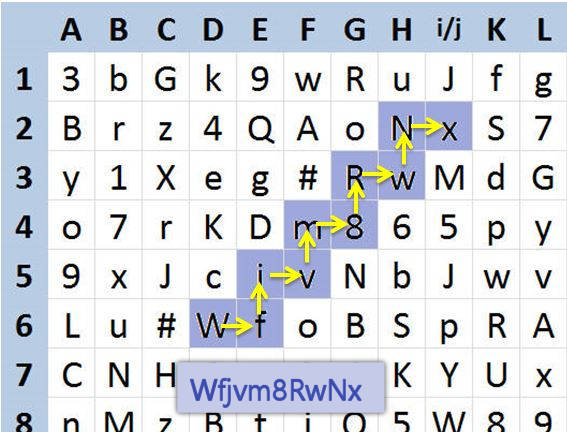

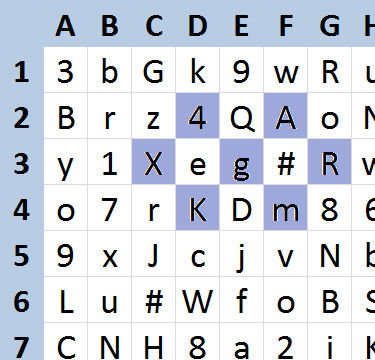

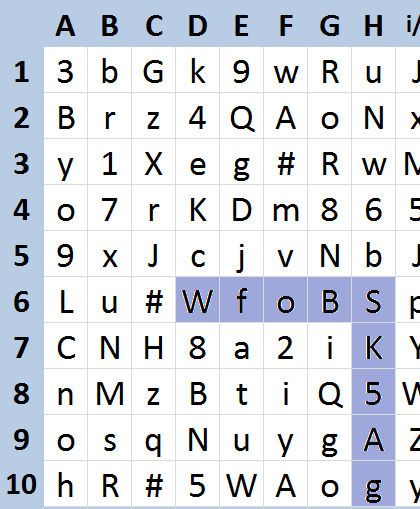
Follow an example on how to use your private shape to obtain a password for a website.
Save your password card or print it
Choose one of the following options to secure your password card:
- Print your password card directly from your smartphone ».
- Take a screenshot of your password card and store it securely.
This way, you remain independent of the E-PasswordCard app and can read your passwords even without the app.